Contxt
2026
Contxt: turning visual references into an AI brief
A local-first macOS app for organising references, explaining their purpose and creating briefs for AI coding tools.

Built so far
One workflow from visual references to a written brief
A working macOS app
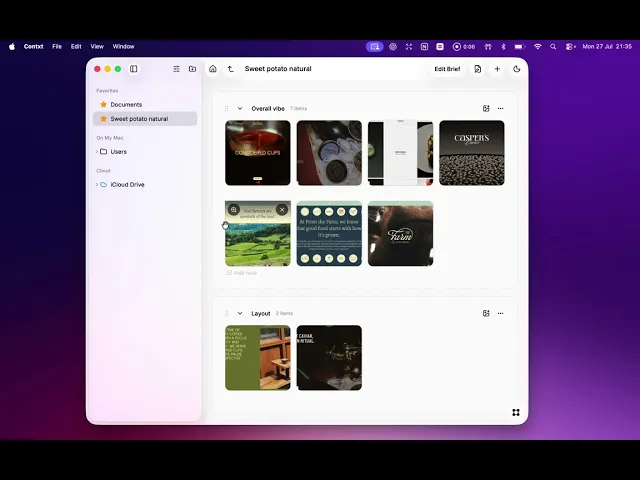
A local-first app brings images, videos, documents and links together on a reference board.
Files stay where they belong
References can be grouped, annotated and reused without moving or duplicating files on disk.
A structured brief for AI
The board and its notes become a CONTEXT.md file that captures direction, priorities and what to avoid.
Overview
From reference folder to project brief
Contxt is a local-first macOS app that turns a project folder into a reference board. Designers can group images, videos, documents and links, add notes about why they matter, and create a brief for AI coding tools.
What it enables
The app helps designers explain what to use, what to avoid and the direction they want to take. It turns the board and its notes into a CONTEXT.md file in the project folder, giving AI tools a structured brief to work from.
Problem
References need an explanation
A folder of screenshots makes sense to the designer who collected it. An AI coding tool also needs to know why each reference matters. Without that explanation, prompts can miss the layout, typography or mood the designer has in mind.
01 — References without structure
02 — Intent left unexplained
03 — No clear handover to AI tools
Research
Stop the ‘Slop’
I say “slop,” but what I really mean is the sameness and homogeneity that design agents often bring to designs, at least for now. I wanted a way to systematically gather inspiration, themes, and vibes that you could give to an agent so your designs would look less generic. And that’s how the idea for Contxt was born.
Ideation
A board that works with the project folder

I explored two parts of the experience: a board for grouping and annotating references, and a brief generator that turns those choices into a written document.
Testing the interactions
I tested dragging files into sections, reordering them and using the same file in more than one section. I wanted to organise references without moving or duplicating files.
Designs
Organise references, then create a brief
The board groups references into sections and lets designers add a note to each placement. Files stay where they are on disk. The brief flow asks about the audience, goals, priorities and creative direction, using the board’s content to suggest answers.
Board: collapsible sections with notes explaining why each reference belongs.

Review Context: define the project, audience and goals.

Creative direction: choose the qualities to use and what to avoid.
Video demo walkthrough
Looking forward
Make visual thinking easier to share
This app, Contxt, was an experiment, and I want to build on it. It may only be a personal tool to jump-start design projects, but I want to see if it can provide more value or find a way to make the process of collecting inspiration more enjoyable.
Explore more


